
OUTPUT
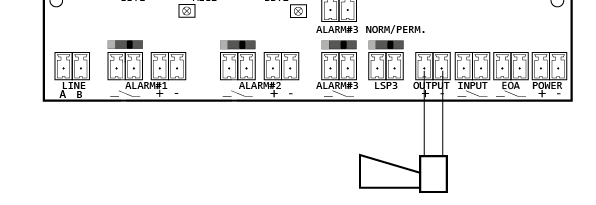
The NRT features a configurable output for controlling external components.
-
Maximum output voltage: 24 V DC, 300 mA (depending on the supply voltage)
Ensure that the NRT power supply is properly sized (refer to Technical data).
Operating modes
-
Off
Output disabled (factory setting). -
Ready (NC)
Keeps the output permanently active as long as a supply voltage is present. -
Fault (NO)
The output is activated when one of the following faults occurs:-
Missing or interrupted telephone line (LINE)
-
Short circuit or interruption of the alarm button (BUTTON)
-
Routine call not transmitted (TIMER)
-
Faulty audio test / alarm test (TEST)
-
-
Fault (NC)
The output is deactivated when one of the following faults occurs:-
Missing or interrupted telephone line (LINE)
-
Short circuit or interruption of the alarm button (BUTTON)
-
Routine call not transmitted (TIMER)
-
Faulty audio test / alarm test (TEST)
-
-
Shaft alarm buzzer (NO)
Activates the output as soon as an alarm button is pressed. Ideal for triggering a shaft alarm buzzer. -
Alarm test (NO)
Activates the output when the “Alarm test” function is enabled. The output is used to trigger remotely operated alarm buttons for testing purposes.
INPUT
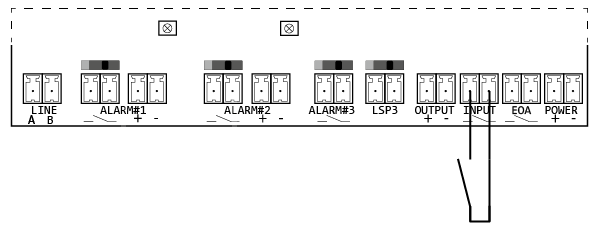
The NRT XT features a configurable input for custom control functions.
Operating modes
-
Off
Input is disabled. -
Filter
When the contact is closed, a filtering (misuse suppression) of the alarm is performed according to DIN EN 81-28:2022 (factory setting). -
Alarm test (EAW)
When the input configured as Alarm Test (EAW) is bridged, pressing an alarm button does not trigger an actual Alarm. Instead, an Alarm test is performed as follows:-
Both pictogram indicators light up (verification by EAW).
-
An audio test is performed for all activated intercom stations.
-
Both pictogram indicators turn off again.
-
Notes on filter mode
-
No Alarm with active filter
If the contact is closed and the “Alarm filter” function is active, NRT will not initiate an alarm. -
Filtering not active during an active alarm
If an alarm is already active (not yet completed), the filter remains inactive and the alarm is processed as usual. -
Test while filter is active
To trigger a real alarm while the alarm filter is active, press and hold the alarm button for more than 30 seconds (adjustable).