Setting the language
The default language of the NRT 1 XT V3 is set to German.
Changing the language to English is carried out as follows:
-
Press the service button to activate service mode.
-
Connect your smartphone to the WiFi network nrt_service.
-
Open the URL 192.168.4.1 using the Chrome browser.
-
Press the ESC button on the displayed control panel.
-
Use the + / – buttons and OK to open the “Einstellungen?” menu.
-
Press the * button until “System?” is displayed and confirm with OK.
-
Use the + buttons until the “Sprache” menu item is displayed.
-
Confirm with OK.
-
Press + and OK.
-
The menu language is now set to English.
-
Press ESC twice. You are now back in the main menu.
Technical Requirements
Operation of NRT requires a dedicated analogue telephone line reserved exclusively.
The following connection types are supported:
-
Analogue telephone line
-
Analogue extension of an PABX
-
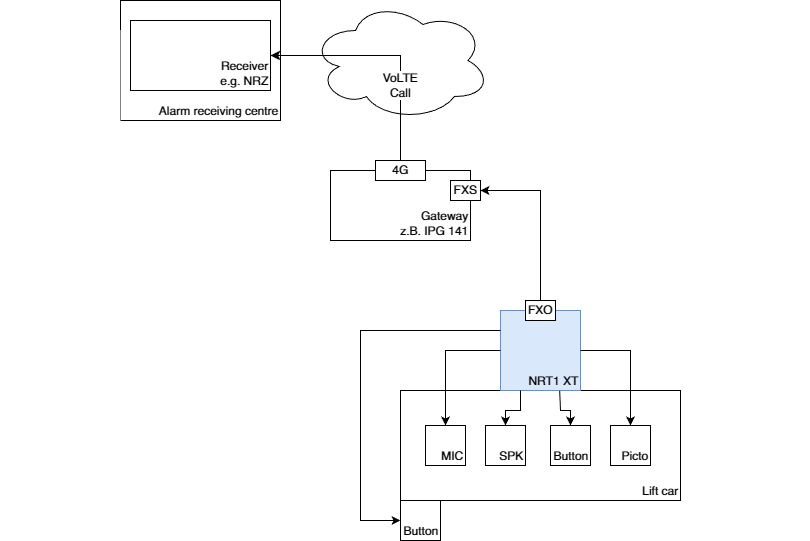
Telegärtner IP gateway
The connection point (TAE socket) should ideally be installed in the machine room or close to the terminal point of the travelling cable.
Two free cores within the travelling cable are required for the telephone line. To reliably avoid interference, use twisted and shielded pair cables.
In addition, a power supply of 12–24 V DC / 600 mA must be available.
Scope of Delivery
|
Article No. |
Type |
Contents |
|
602600 |
NRT 1 XT |
|
Intended Use
-
Voice alarm call system for lifts in accordance with DIN EN 81-28.
Schematic Layout with IP Gateway (IPG 14X)